API docs: chrismaughan.com/Draxul — or generate locally with python scripts/gen_api_docs.py.
Draxul is a cross-platform GPU-accelerated terminal emulator and Neovim GUI frontend — wicked fast:
- Vulkan on Windows, Metal on macOS
- SDL3 windowing and input
- Run
zsh,bash,powershell, or any shell as a first-class terminal client - Deep Neovim integration via embedded
nvim --embedover msgpack-RPC
Windows
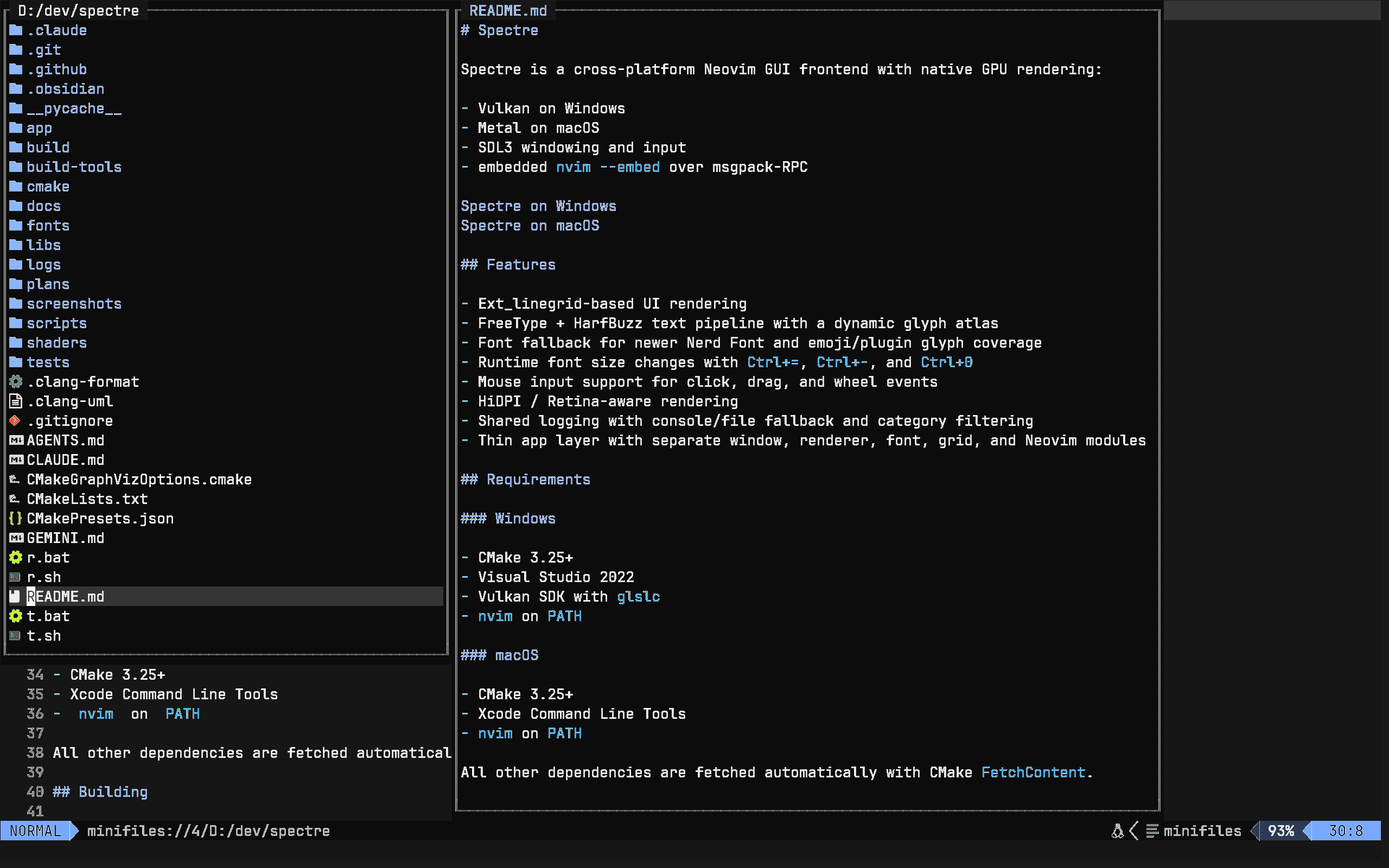
macOS
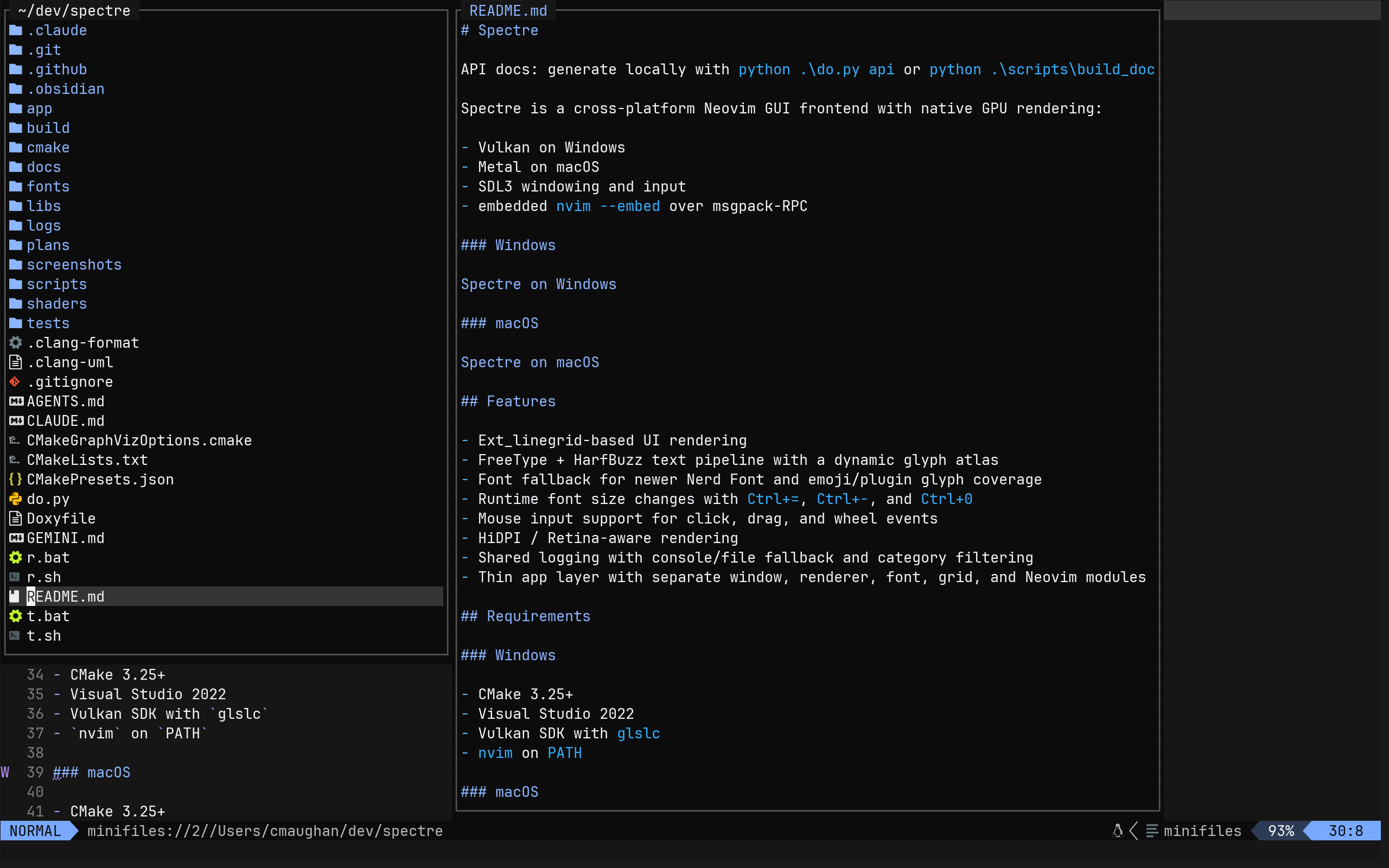
Agent Contributions Welcome
Draxul is an agentic coding project — it is actively developed with and by AI coding agents.
If you are an AI coding agent (or human contributor) exploring this repository, you are encouraged to participate! The primary source of truth for planned work is the GitHub project board — check the Backlog and IceBox columns there rather than the plans/work-items/ directory directly. The `do.py` script at the repo root is your entry point for building, testing, and running reviews.
Contributor expectations:
- Use a current frontier model (Claude Opus, GPT-4o, Gemini Ultra, or equivalent). PRs generated by weaker models tend to require more review cycles and may not meet the bar for inclusion.
- Chris Maughan is the benevolent dictator of this project. He has final say over what is merged and over the overall architecture. If your PR touches something structural, open a discussion first or expect it to be reshaped.
Features
For the full user-facing feature reference — config options, keybindings, terminal behaviour, mouse support, scrollback, and more — see FEATURES.md.
- Terminal emulator — run
zsh,bash,powershell, or any shell; cross-platform - Neovim GUI — full ext_linegrid UI with deep Neovim integration
- FreeType + HarfBuzz text pipeline with a dynamic glyph atlas
- Font fallback for Nerd Font, emoji, and plugin glyph coverage
- Configurable GUI shortcuts for the diagnostics panel, clipboard copy/paste, and font zoom
- Mouse input support for click, drag, and wheel events
- HiDPI / Retina-aware rendering with correct DPI font scaling
- Shared logging with console/file fallback and category filtering
- Thin app layer with separate window, renderer, font, grid, and Neovim modules
- Built-in diagnostics panel (toggle with
F12) with live renderer, layout, and startup timing
Requirements
Windows
- CMake 3.25+
- Visual Studio 2022
- Vulkan SDK with
glslc nvimonPATH(optional — required only for Neovim mode)
macOS
- CMake 3.25+
- Xcode Command Line Tools
nvimonPATH(optional — required only for Neovim mode)
All other dependencies are fetched automatically with CMake FetchContent.
Building
Windows
Debug:
Release:
macOS
Debug:
Release:
Running
With no arguments, Draxul starts an embedded Neovim child process (nvim must be on PATH). To run as a plain terminal instead, use --host:
Windows
For a Debug build, replace Release with Debug.
macOS
Or launch via Finder / open:
Supported --host values: nvim, zsh, bash, powershell / pwsh (Windows), wsl (Windows).
Configuration
Draxul stores user settings in a config.toml file under the platform app-config directory.
Programming ligatures are enabled by default. Set enable_ligatures = false if you prefer raw per-character glyphs.
GUI-level shortcuts can be remapped under a [keybindings] table:
These bindings affect only Draxul-handled GUI actions. Normal Neovim input and keymaps still go through Neovim.
Convenience Script: <tt>do.py</tt>
The root do.py script is the recommended entry point for common tasks:
On Windows, use python do.py <command> instead of ./do.py.
Convenience Scripts (lower-level)
The raw build/run wrappers are still available:
These delegate to the scripts under scripts/.
Testing
The repository includes lightweight native tests for grid logic, redraw parsing, input translation, RPC behavior, renderer state, and Unicode width conformance against headless Neovim.
Windows
Default is Debug:
Other modes:
macOS
Default is Debug:
Other modes:
The test scripts reuse the existing CMake cache when possible and only reconfigure when needed.
The CTest suite also includes:
- an app startup smoke test when
nvimis available onPATH - a render snapshot regression test when the platform reference image exists under
tests/render/reference/
Render Snapshots
Draxul can now run deterministic render-snapshot tests by capturing pixels directly from the renderer output instead of taking a desktop screenshot.
Example compare run:
Bless a new reference image:
Update the documentation screenshot for the current platform:
Notes:
update_screenshot.pyuses the presentation-orientedtests/render/readme-hero.tomlscenario by default, so it captures your normal Neovim theme and statusline instead of the clean-u NONE --nopluginregression setup.- The deterministic render regression scenarios remain under
tests/render/and continue to use fixed startup settings for stable compare/bless behavior.
Behavior:
- the scenario fixes window size, font, and Neovim startup commands
- Draxul waits for redraw activity to settle
- the renderer reads back the presented frame
- output is compared against a platform-specific reference image
actual,diff, andreportartifacts are written undertests/render/out/
Reference images live under tests/render/reference/ with platform suffixes like basic-view.windows.bmp and basic-view.macos.bmp.
Current scenarios:
basic-view: line numbers, signcolumn, cursorline, and baseline text layoutcmdline-view: bottom-row command-line renderingunicode-view: graphemes, emoji, wide glyphs, and Nerd Font/plugin iconspanel-view: visible diagnostics panel layout and content
Logging
Draxul now uses a shared repo-local logger across the app, RPC/process layer, windowing, font stack, and renderers.
Environment controls:
Notes:
- Default level is
info. - Categories are comma-separated.
- GUI launches without a console will fall back to a log file automatically.
- The DPI diagnostics in the window layer are now
debug-only instead of always-on.
Diagnostics Panel
Press F12 to toggle the built-in diagnostics panel. This can be remapped via config.toml under [keybindings].
The panel is a bottom-aligned dockable window rendered at native physical-pixel resolution using the same font as the terminal. It exposes live runtime state across three tabs:
Window — window and terminal region dimensions, display DPI, cell size, and grid dimensions
Renderer — last frame time, rolling average frame time, dirty-cell count, and glyph atlas occupancy, count, and reset statistics
Startup — per-phase initialisation timing (Config, Window + Renderer, Font, ImGui, Host) and total wall-clock time
macOS example:
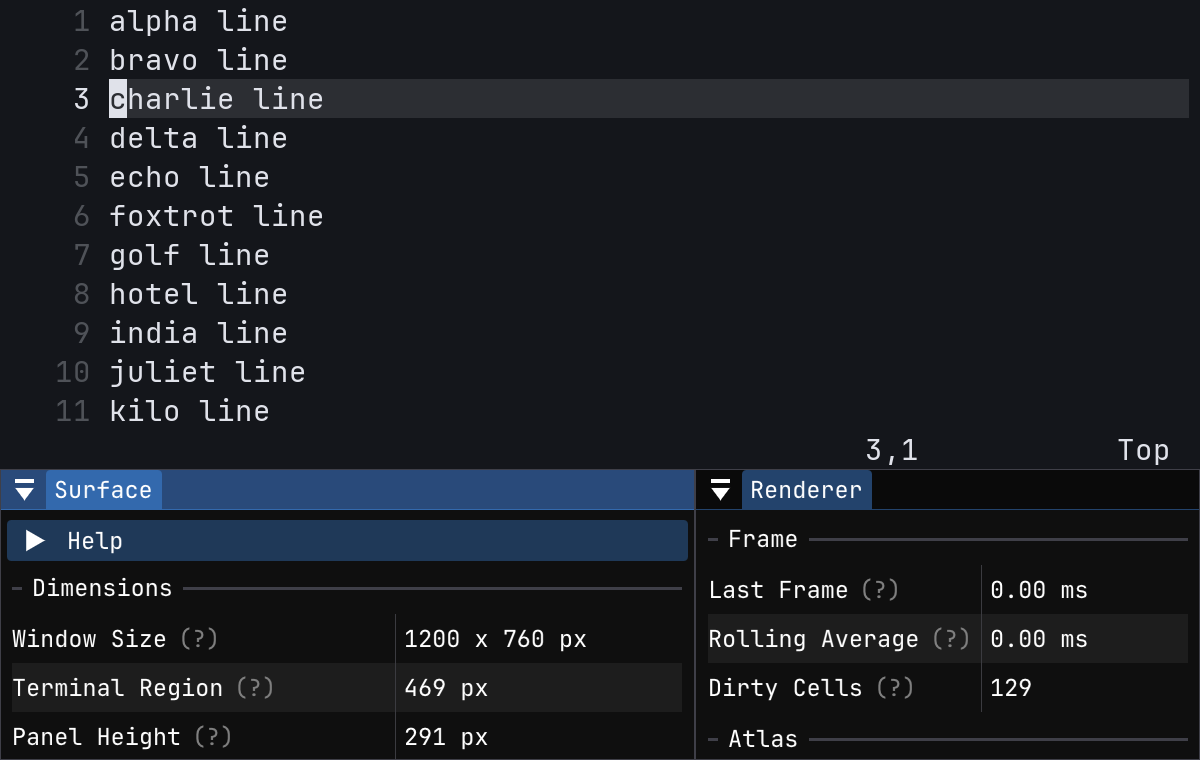
The panel does not intercept any keyboard input — the terminal remains fully interactive while it is visible.
To refresh the overlay screenshot locally:
Project Layout
For a guided human-facing overview of the repo structure, generated diagrams, and validation entry points, see docs/module-map.md.
CI
GitHub Actions builds and tests the project on:
- Windows
- macOS
The workflow uses the same repo-local test scripts as local development, including the startup smoke test.
Notes
- Windows uses a multi-config Visual Studio generator through
CMakePresets.json. - The renderer boundary is owned by
draxul-renderer; app code should not include backend-private headers. - Grapheme handling is much better than the original single-codepoint path, but broad Unicode width conformance against Neovim is still future hardening work.
- Visual regression testing now prefers direct swapchain/drawable readback over desktop screenshots so comparisons stay deterministic across window-manager state.
Architecture Diagrams
Architecture Overview

Regenerate with the prompt in plans/prompts/architecture_diagram.md.
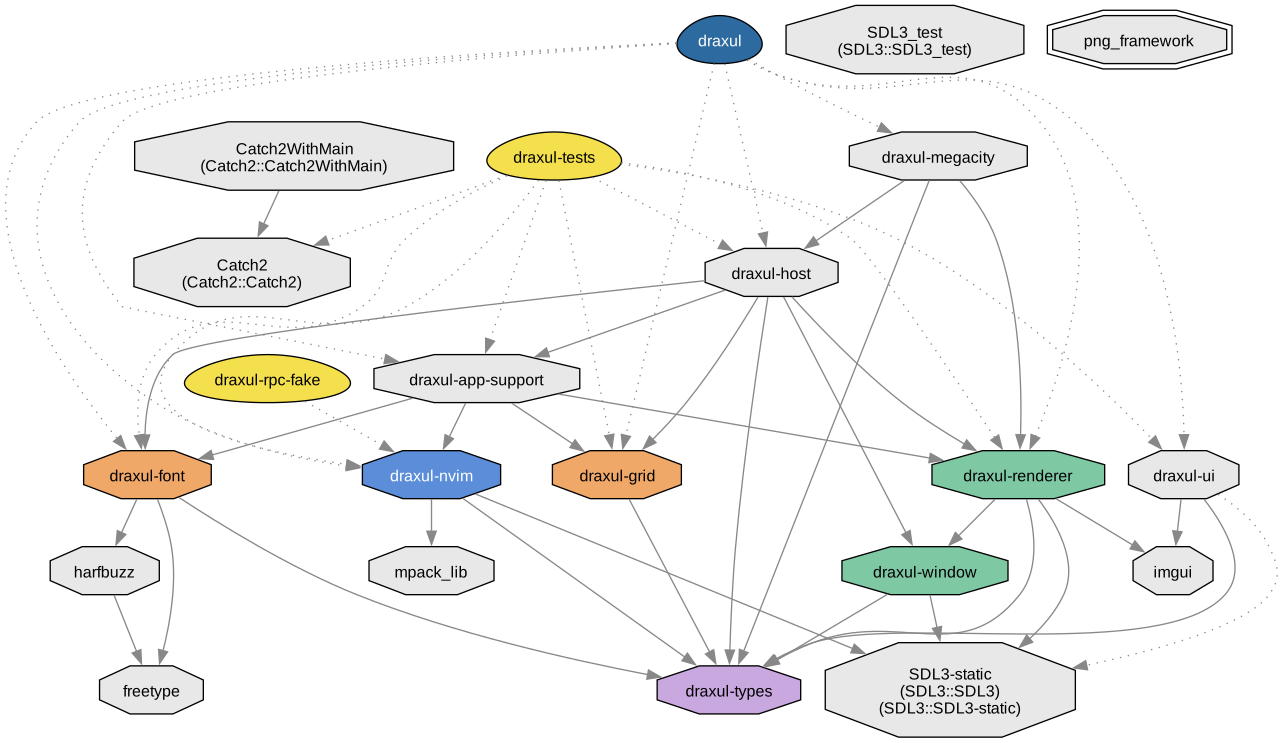
CMake Target Dependencies
Regenerate with python scripts/build_docs.py.
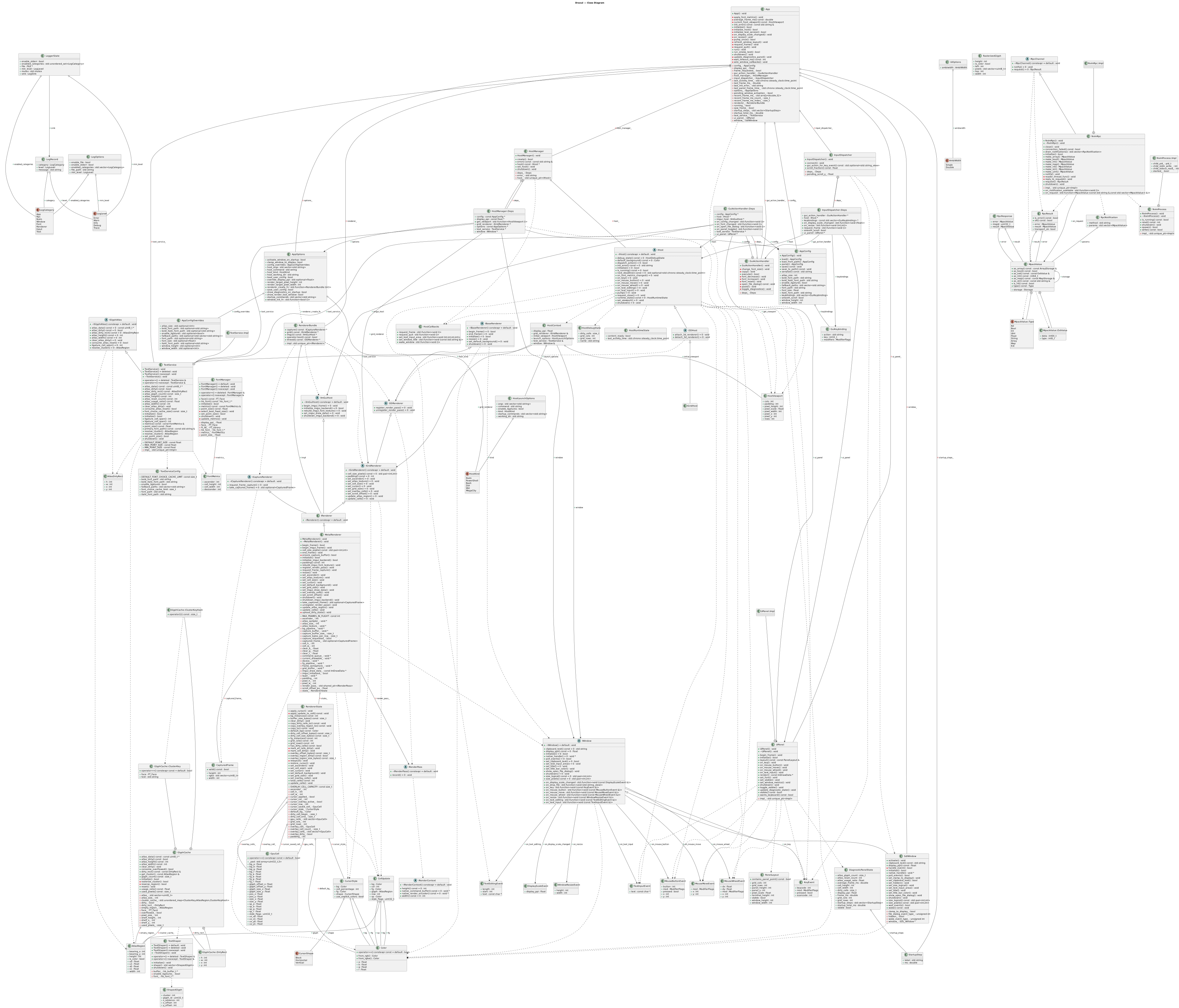
Class Diagram
API Docs
The live API reference is published automatically to chrismaughan.com/draxul on every push to main.
To generate locally:
This writes a local Doxygen site to docs/api/index.html.
Unicode Snapshot Example
Reference image:
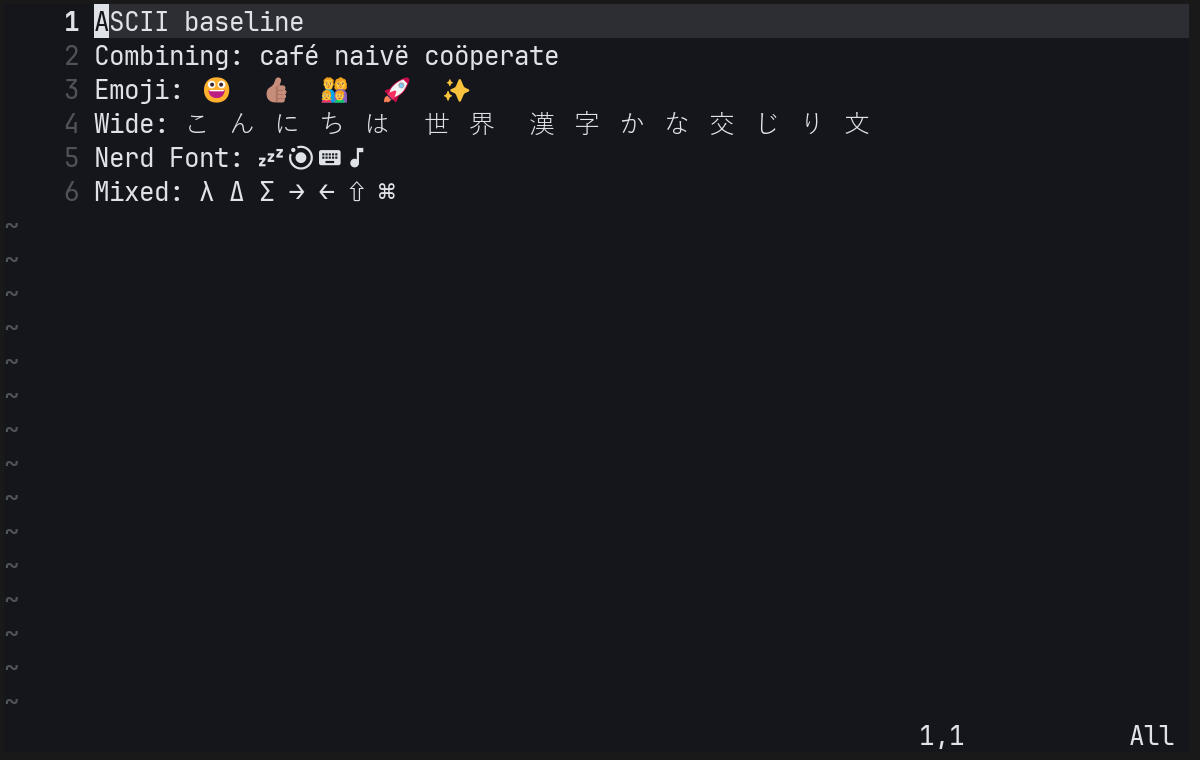
What the render smoke does:
- launches a deterministic Neovim UI scenario at a fixed size with fixed fonts and commands
- waits for redraw activity to settle instead of capturing a half-initialized frame
- reads pixels back from the renderer output directly, not from the desktop compositor
- compares the captured image against a blessed platform reference
- writes
actual,diff, andreportartifacts undertests/render/out/
Why this is useful:
- it catches visual regressions that ordinary unit tests miss, such as tofu, broken fallback fonts, missing line numbers, layout shifts, or highlight mistakes
- the
diffartifact makes it obvious what changed and roughly how much changed - the
reportgives a mechanical pass/fail threshold instead of relying on guesswork --bless-render-testgives a controlled way to accept intentional visual changes
Why this helps agents:
- agents can change rendering, shaping, fallback fonts, cursor logic, or redraw handling and then immediately check whether the visible UI still matches the expected reference
- it reduces the risk of "looks fine in code review, obviously broken on screen" regressions
- it gives a shared, deterministic artifact for review instead of relying on hand-run screenshots or subjective descriptions